As of: 19 June 2026 · Reading time: 5 min
Key takeaways
- Learn how agile methods help with software recovery.
- Scrum, Kanban and best practices for saving failed projects.
Learn how agile methods help with software recovery. Scrum, Kanban and best practices for saving failed projects.
“Proactive maintenance costs a fraction of what an unplanned outage causes.”
– Björn Groenewold, Managing Director, Groenewold IT Solutions
Why Agile Methods Help With Software Maintenance
Learn how agile methods help with software recovery.
When planning Agiles project management in software maintenance from idea to delivery, Cost Calculator: AI Development, Discover solutions, Software Maintenance sowie Cost Calculator: Software Maintenance offer practical next steps on our site.
Software maintenance is not a linear project. New issues appear unpredictably. Needs evolve. Systems must remain stable while being improved.
Agile frameworks are well-suited to this environment. They provide structure without rigidity. They create clarity without bureaucracy.
Six Reasons Why Agility Helps
Software maintenance projects that struggle typically share the same problems. Agile methods address each one:
- Unclear project status — Short iterations create rapid clarity; everyone knows what is being worked on this week.
- Lost stakeholder confidence — Regular demonstrations with working software restore trust faster than status reports.
- Unknown technical risks — Stepwise development surfaces hidden problems before they become critical.
- Unmotivated teams — Self-organization and sprint autonomy increase engagement.
- Scope creep — A prioritized backlog keeps the team focused on what matters most.
- Knowledge gaps — Retrospectives create structured learning after each cycle.
Scrum for Software Maintenance Projects
Adapting Scrum for Maintenance Context
Short: Standard Scrum uses two-week sprints focused on feature delivery.
Standard Scrum uses two-week sprints focused on feature delivery. For maintenance projects, adapt the framework:
- Shorten sprints to one week during crisis stabilization.
- Define "Definition of Stable" before pursuing new features.
- Reserve 20–30% of sprint capacity for unplanned issues.
The Four Scrum Events in Maintenance
Short: Sprint Planning — The team selects the most critical items from the backlog.
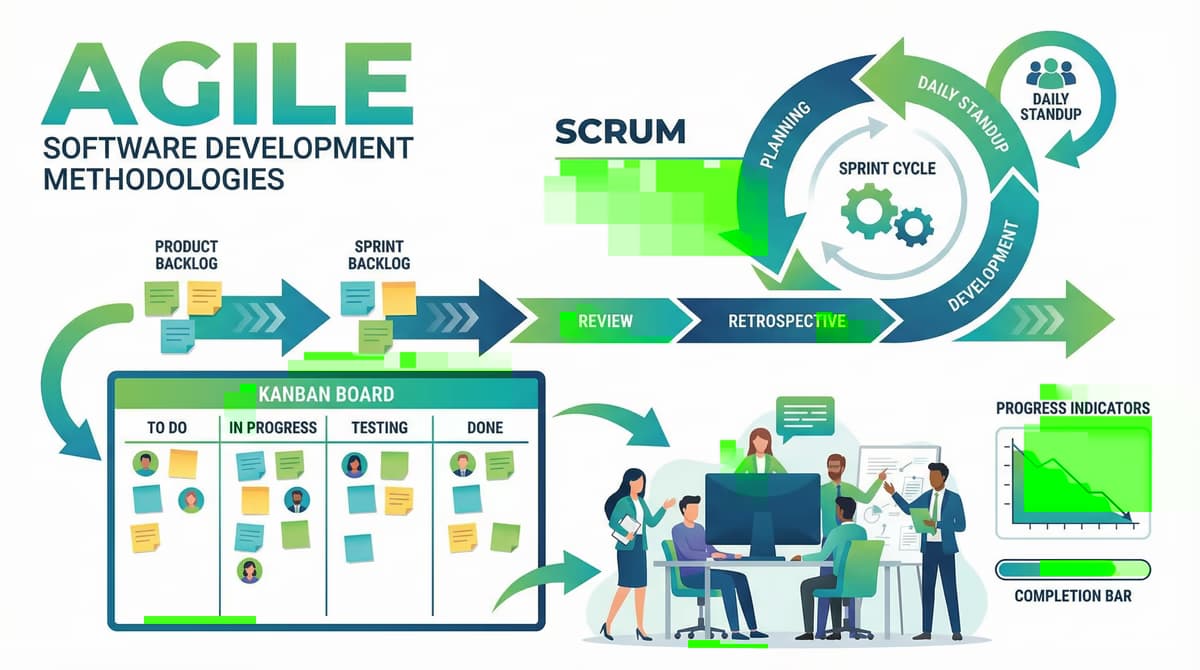
Sprint Planning — The team selects the most critical items from the backlog. For maintenance, this includes both planned improvements and known issues.
Daily Standup — 15-minute daily sync: what was done, what is planned today, what is blocked. Keeps the team aligned without long meetings.
Sprint Review — Show working software to stakeholders at the end of each sprint. Show what was stabilized or improved — not just what was fixed.
Retrospective — After each sprint: what worked, what did not, what changes next sprint. This is where teams learn.
Stabilization Before Features
Short: In maintenance rescue situations, stability comes first.
In maintenance rescue situations, stability comes first. Establish a "Definition of Stable" — agreed criteria for when the system is stable enough to begin feature development.
Without this boundary, maintenance and feature work compete for the same capacity, and neither is done well.
Kanban for Continuous Maintenance
When Kanban Fits Better Than Scrum
Kanban suits maintenance environments where:
- The scope of work is unclear at the start.
- New tasks arrive steadily and unpredictably.
- There is no clear sprint-end delivery expectation.
The Three Kanban Principles for Maintenance
Short: WIP limits — Limit the number of tasks in progress simultaneously.
WIP limits — Limit the number of tasks in progress simultaneously. This prevents the team from spreading too thin.
A task in progress should be finished before a new one starts.
Swimlanes — Separate stabilization work from new development on the same board.
This makes the allocation of effort visible and prevents maintenance from being crowded out by feature requests.
Metrics — Track Lead Time (from task creation to completion) and Cycle Time (from task start to completion). Improving these numbers is the goal.
Five Critical Agile Practices for Maintenance Teams
- Daily standups — 15 minutes, every day, same time. Not optional during active stabilization.
- Retrospectives — Not optional when projects have problems. Problems without reflection repeat.
- Timeboxing — Discussions without a time limit become blockers. Define the box, make the decision, move on.
- Prioritized backlog — Everything is not equally urgent. Someone must make the call.
- Continuous integration — Automated tests catch regressions before they reach users.
Three Common Mistakes in Agile Maintenance Projects
- Using "agile" to justify absent planning — Agile means stepwise and adaptive, not unstructured. A maintenance backlog without priorities is not agile. It is chaos with a label.
- Extending sprint duration — Longer sprints reduce feedback frequency. They delay the discovery of problems. If two weeks is too long, go to one week.
- Retrospectives without action — A retrospective that identifies problems but produces no changes is a meeting that wastes time. Every retrospective must end with at least one concrete action item assigned to a specific person.
Agile as a Tool, Not a Dogma
Short: Agile methods are tools.
Agile methods are tools. They exist to help teams deliver better results, not to be applied dogmatically.
Adapt the framework to the situation. Shorten or lengthen cycles based on what the project needs. Keep what works. Change what does not.
"Proactive maintenance costs a fraction of what an unplanned outage causes." — Björn Groenewold, Managing Director, Groenewold IT Solutions
Frequently Asked Questions (FAQ)
What is this article about: “Agiles project management in software maintenance”?
This post explores Agiles project management in software maintenance from the perspective of needs, typical pitfalls. And sensible next steps.
In short: Learn how agile methods help with software recovery. Scrum, Kanban and best practices for saving failed projects.
Who benefits most from the content described here?
Useful for project leads and product owners in Software maintenance who must choose between standard software, custom development, and integration.
How does this topic fit into an IT or digital strategy?
Technically and organizationally, alignment with experienced partners pays off — from requirements to operations; start with the [services overview](/en/services/artificial-intelligence). For multi-system landscapes, [IT consulting and architecture](/en/services/it-consulting) helps align vendors and internal teams.
What are sensible next steps if we need support?
A practical next step: book a consultation and clarify which MVP or pilot fits your team and landscape.
References and further reading
The following separate references complement the topics in this article:
About the author

Managing Director of Groenewold IT Solutions GmbH and Hyperspace GmbH
Since 2009 Björn Groenewold has been developing software solutions for the mid-market. He is Managing Director of Groenewold IT Solutions GmbH (founded 2010) and Hyperspace GmbH. As founder of Groenewold IT Solutions he has successfully supported more than 250 projects – from legacy modernisation to AI integration.
Blog recommendations
Related articles
These posts might also interest you.

Code review: Detecting quality problems early
Learn how code reviews reveal quality problems early. Best practices, checklists and tools for effective code reviews.

Software Rescue: How to bring back failed IT projects
Not every software project runs according to plan. Budget surpasses, missed deadlines or technical dead endes can meet any company. The good news: Most projects can still be saved. This guide will…

Security in software maintenance: How to protect your...
Security is a critical aspect of software maintenance. We will show you the most important safety practices that cannot be missed in any maintenance process.
Free download
Checklist: 10 questions before software development
Key points before you start: budget, timeline, and requirements.
Get the checklist in a consultationRelevant next steps
Related services & solutions
Based on this article's topic, these pages are often the most useful next steps.
Related services
Related solutions
Practical next steps after Agiles project management in software maintenance
Agiles project management in software maintenance addresses a practical choice for product and IT teams. Start with one clear goal: protect stable operations while fixes, updates, and future releases stay predictable.
Check the current process, the data involved, and the result users need. Then record the main risks and define a small first step. This keeps the decision easy to review and gives your team a shared basis.
For implementation support, our software maintenance and support connects the article's guidance with architecture, delivery, and stable operations. Engineering and project ownership stay with our team in Leer, Germany.
This post belongs to Software maintenance. Browse the related Software maintenance articles or use the English software blog for other topics.
When budget is the next question, the software cost calculators provide planning ranges. The IT glossary explains key terms, while in-depth technology guides cover wider decisions.
If the topic affects a live project, book a technical consultation or send the context through our project contact form. We usually reply within one working day.